Any platform with an integration
Add an “External application” agent and connect it to your platform through the AIRONIK protocol. If no integration is available, your platform's developer can build one.
AIRONIK is a single messenger for bots and AI employees on any platform. Watch their customer conversations live, bring in your team and join the conversation when a person is needed.
Prices and connection terms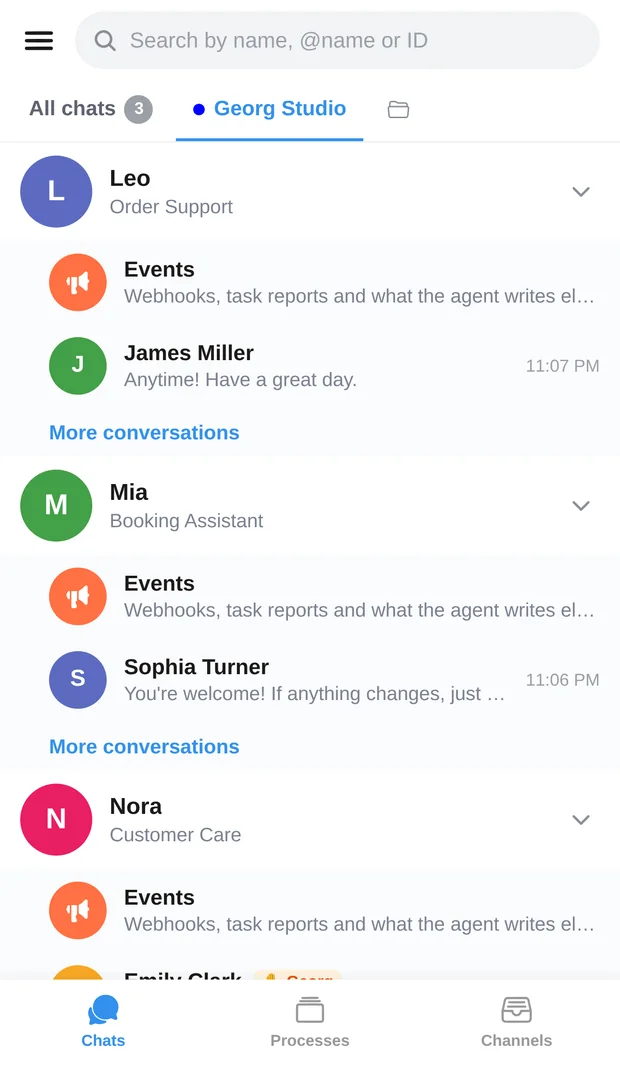
Your company's bots can be built by us, other developers, colleagues or automation specialists. What matters to AIRONIK is connection through the protocol, whoever built the bot.
Add an “External application” agent and connect it to your platform through the AIRONIK protocol. If no integration is available, your platform's developer can build one.
Open the customer conversations for the bot you need and follow messages as they arrive. Different agents are available in one app.
Take over a conversation and reply to the customer yourself. The bot stays silent during takeover; you can then hand the conversation back.
AIRONIK brings together the different aspects of your bots' work with your company.
Bots' customer conversations, with the option for an operator to join.
An incoming feed of orders, webhooks and other events. View, export and mark entries as read. Sending messages to channels is not supported.
Requests with INS and their status appear under “Processes”. INS support is enabled separately for external bots.
Employee access to agents: from viewing conversations to full management within assigned permissions.
Additional search through your bot's data stored in AIRONIK. The external platform uses it through the integration (RAG).
A section for viewing reviews available to your account.
Open the AIRONIK web app and register.
Create an “External application”, obtain an API key and confirmation code, and enter them on your platform.
Set the synchronization interval and decide whether the bot needs the AIRONIK knowledge base and INS.
Follow conversations, join as an operator and give employees the access they need.
If bots talk to your customers on several platforms, it is convenient to see their conversations in one place.
If employees need to view conversations and take over difficult requests.
If you connect bots for different clients and want to give their teams a common interface.
An external bot stays on its own platform and uses that platform's AI model. AIRONIK receives its conversations and events through the integration.
The bot's platform must support the AIRONIK protocol. The API key and confirmation code are used in that integration; they alone cannot connect a service without protocol support.
A PWA web app and Android APK are available. You can open the web app on a computer or phone, including iPhone.
Subscriptions are calculated per bot, with optional features chosen separately. All prices and discounts are on the benefits page under “Prices”.
Connect an existing bot and see how its customer conversations appear in AIRONIK. Then add the other agents and set up team access.