One interface for different bots
View the available conversations of connected agents in one app, even when the bots run on different platforms.
When several bots reply to customers, you need to understand what is happening in their conversations. AIRONIK gives your company a shared messenger for observation, operator participation and teamwork.
Prices and connection terms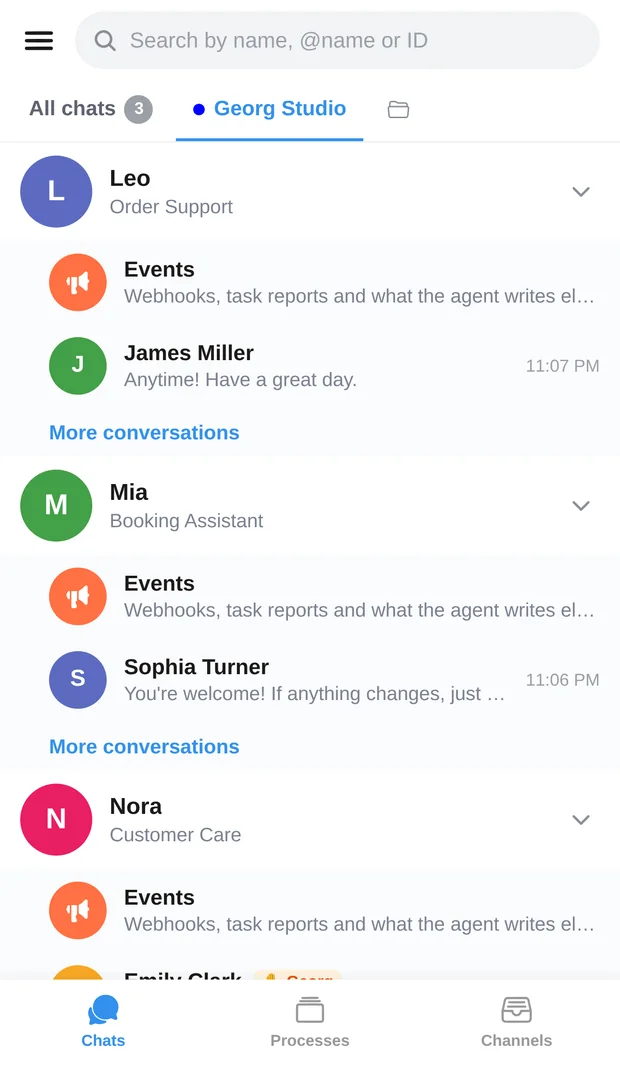
View the available conversations of connected agents in one app, even when the bots run on different platforms.
The operator sees the context, takes over and replies to the customer. The bot stays silent while the operator participates.
Assign agent permissions to employees: viewing for some, replying and management for others.
Orders and website webhooks collect in channels. View, mark as read and export them.
With INS enabled, requests and their status are available in processes. This helps you find the request you need.
Choose the AIRONIK knowledge base, INS and subscription period separately for each bot.
Follow bots' conversations with customers and collect order events from connected sources.
View available conversations and hand them to an employee when human participation is needed.
Unite bots from different providers through the AIRONIK protocol while they keep running on their own platforms.
Start with an agent that has a clear flow of customer requests.
Configure the AIRONIK integration with the API key and confirmation code.
See whether viewing conversations and bringing in an operator works well for you.
Give employees the access they need and connect your other bots.
A subscription for each bot. You choose optional features and the payment period.
Connect a bot to AIRONIK without the optional knowledge base and INS features.
AIRONIK knowledge base (RAG): +1 AI².
INS: +1 AI².
Basic subscription with either feature: 3 AI² per bot per month.
Basic subscription and both optional features for one bot.
| Period / discount | Basic | Full package |
|---|---|---|
| 1 monthNo discount | 2 AI² | 4 AI² |
| 3 months−10 % | 5,4 AI² | 10,8 AI² |
| 6 months−15 % | 10,2 AI² | 20,4 AI² |
| 12 months−25 % | 18 AI² | 36 AI² |
Payment is in AI². The price is calculated separately for each bot. The period discount also applies to selected optional features. Auto-renewal is available and can be managed in the app.
Creating your first “External application” adds 4 AI² to your AIRONIK balance: the price of one month of the full package for one bot. The gift is issued once; choose your subscription in the app.
Platform partners with published paid AI models or paid business pages may be exempt from payment if they meet platform conditions. Eligibility is checked for your account and shown in subscriptions.
Yes. AIRONIK treats all bots equally, whoever built them. Their platforms must support the AIRONIK connection protocol.
Your first “External application” comes with a one-time gift of 4 AI² to your AIRONIK balance. That covers one month of the basic subscription with the knowledge base and INS for one bot.
The chosen features and subscription period are counted for each bot, then the amounts are added together. Table prices cover one bot for the full period.
Yes, you can manage auto-renewal in the app. Turning it off preserves access until the end of the period already paid for.
If your platform already supports AIRONIK, configure its integration using the issued key and code. Otherwise, help from the platform's developer is required.
Connect an existing bot and see how its customer conversations appear in AIRONIK. Then add the other agents and set up team access.